
Share a Greeting. Send a Smile. Make Someone’s Day!
Sharing a greeting card has never been easier!
At AppyGreeting.com, you’ll find beautiful digital greeting cards, pictures and animations for birthdays, Christmas, New Year, Easter, anniversaries and many other special occasions.
You can save your favourite greeting cards to your phone, tablet or computer, or share them with friends and family using WhatsApp, Facebook, Instagram, Viber, Telegram, email and other messaging services.
You don’t need to register, create an account or use special sharing buttons on our website. Simply use your device’s normal controls to save or share your favourite greetings.
1. How to Share or Download Greeting Cards on a Mobile Phone
Whether you use an iPhone, Samsung, Google Pixel or another Android phone, saving a greeting card is usually very straightforward.
<AsyncImage query=”smartphone finger long pressing digital greeting card image on screen” aspectRatio=”16:9″ width=”100%”/>
Step 1 – Find Your Favourite Greeting
Browse AppyGreeting.com and open the greeting card you would like to send.
Step 2 – Press and Hold the Image
Place your finger on the greeting card image and keep it pressed for a second or two.
A menu should appear on your screen.
Step 3 – Choose What You Want to Do
Depending on your phone and browser, you may see options such as:
- Save Image – Download the greeting card to your phone.
- Download Image – Save a copy to your device.
- Share – Open your phone’s sharing menu.
- Copy Image – Copy the image where supported.
Select the option you want.
Step 4 – Send Your Greeting
If you saved the image, open your Photos, Gallery or Downloads folder.
Choose the image and use your phone’s Share option to send it through:
- Viber
- Telegram
- Other messaging applications.
You can also add your own personal message before sending.
2. How to Share or Download Greeting Cards on an iPhone or iPad
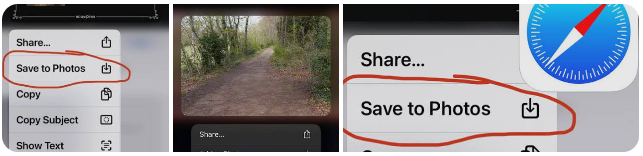
If you use an iPhone or iPad, follow these steps:
- Open AppyGreeting.com using Safari or another browser.
- Find the greeting card you want.
- Touch and hold the image with your finger.
- Wait for the options menu to appear.
- Select Save to Photos or the available download option.
- Open your Photos app to find your saved greeting.
- Tap the Share icon (the square with an upward arrow).
- Choose WhatsApp, Messages, Mail or another available application.
- Select your recipient and send your greeting.
Your greeting card is now ready to share!
3. How to Share or Download Greeting Cards on an Android Phone
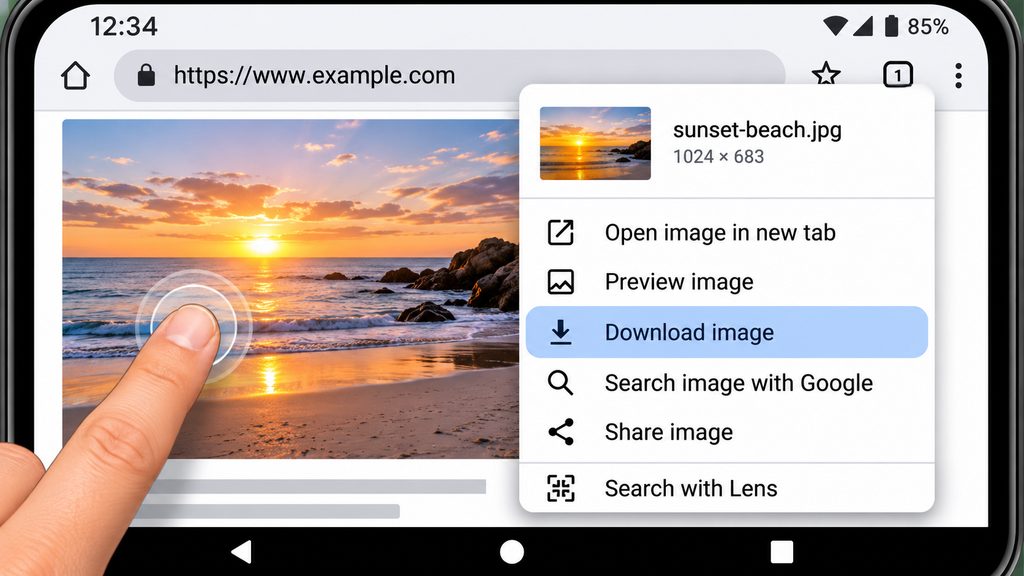
If you use a Samsung, Google Pixel or another Android phone:
- Open AppyGreeting.com in Chrome or your preferred browser.
- Find the greeting card you like.
- Press and hold the image with your finger.
- Wait for the menu to appear.
- Select Download image or Save image, if available.
- Open your Gallery, Photos or Downloads folder.
- Find the saved greeting card.
- Tap the Share icon.
- Choose WhatsApp, Facebook, Telegram or another application.
- Select the person you want to send it to.
That’s all there is to it!
4. How to Share or Download Greeting Cards on a Computer or Laptop
If you’re using a desktop computer or laptop, you can save greeting cards using your mouse or touchpad.
Step 1 – Find Your Favourite Greeting
Browse AppyGreeting.com and open the greeting card you want to save.
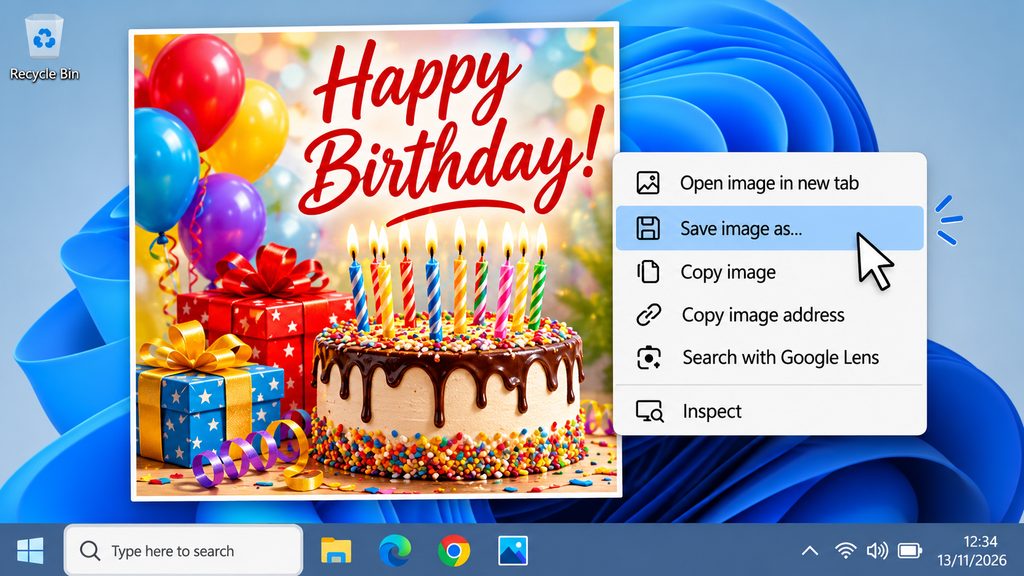
Step 2 – Right-Click the Image
Move your mouse pointer over the greeting card image.
Press the right-hand mouse button.
A menu should appear on your screen.
Step 3 – Select Save Image As
Choose Save image as… from the menu.
Depending on your browser, the wording may be slightly different.
Step 4 – Choose Where to Save It
Select a folder on your computer, such as:
- Downloads
- Pictures
- Desktop
- My Images
You can also give the image a name before clicking Save.
Step 5 – Share Your Greeting
Once downloaded, you can attach the greeting card to an email, upload it to social media or send it through a messaging application.
You can also share the webpage link by copying the address from your browser and pasting it into a message.
5. How to Share Greeting Cards Using WhatsApp
Once you have saved your favourite greeting card, sending it through WhatsApp is easy.
On a mobile phone:
- Open WhatsApp.
- Choose the person or group you want to send the greeting to.
- Tap the attachment or plus icon.
- Choose Photos, Gallery or the relevant image selection option.
- Select your saved greeting card.
- Add a personal message if you wish.
- Press Send.
On a computer:
- Open WhatsApp Web or the WhatsApp desktop application.
- Open the conversation with your chosen recipient.
- Select the attachment icon.
- Choose Photos and Videos or the file attachment option.
- Find your downloaded greeting card.
- Select it and send.
6. How to Share Greeting Cards on Facebook and Instagram
After saving a greeting card to your device, you can use it in your social media posts.
Facebook:
- Open Facebook.
- Start a new post.
- Select Photo/Video.
- Choose your saved greeting card.
- Add a message or birthday wish.
- Select Post.
Instagram:
- Open Instagram.
- Select Create or the plus icon.
- Choose Post or Story.
- Select your saved greeting image.
- Add a caption, stickers or your own message.
- Share it with your followers.
You can also send saved greeting images through Instagram Direct Messages.
7. How to Share Animated Greeting Cards and GIFs
Animated greetings are a fun way to send birthday wishes, Christmas greetings and other special messages.
If an animated greeting is available as a downloadable GIF:
- Open the animated greeting on AppyGreeting.com.
- On a phone, press and hold the animation and look for a download option.
- On a computer, right-click and look for a save or download option.
- Save the GIF to your device if downloading is supported.
- Open your preferred messaging application.
- Select the saved GIF and send it.
Important: Some browsers and websites do not offer a download option when you press or right-click an animation. Some images may also be displayed as part of a webpage rather than as a separate downloadable file. If this happens, try the available download option or share the webpage link instead.
Some social media services may convert animated GIFs into static images, so check that your animation plays correctly before sending.
8. Can I Share a Greeting Card Without Downloading It?
Yes!
You can share a link to the greeting card webpage without saving the image.
Simply:
- Open the greeting card you want to share.
- Copy the webpage address from your browser’s address bar.
- Open WhatsApp, Facebook, Telegram, email or another messaging service.
- Paste the link into your message.
- Add a personal greeting and send it.
Your friend or family member can click the link to visit AppyGreeting.com and view the greeting themselves.
Frequently Asked Questions
Do I need to register to download greeting cards?
No. You can browse and save greeting cards without registering or creating an account with AppyGreeting.com.
Are the greeting cards free?
Yes! Our aim is to provide free digital greeting cards, images and animations for everyone to enjoy and share.
Why doesn’t a menu appear when I press and hold an image?
Some phones and browsers behave differently. Make sure you are pressing directly on the image and holding your finger down for a second or two.
If no menu appears, try opening the image separately if that option is available, or use your browser’s download options.
Why can’t I save an animated greeting?
Some animations are displayed within webpages and may not be directly downloadable. The availability of a download option depends on the image format, browser and device.
Where do my downloaded greeting cards go?
On an iPhone or iPad, check your Photos app or Files app.
On an Android phone, check your Gallery, Photos or Downloads folder.
On a Windows computer, check your Downloads or Pictures folder.
On a Mac, check your Downloads folder or the location selected in your browser.
Can I send greeting cards to people in other countries?
Absolutely! You can share greeting cards with friends and family around the world using email, messaging services and social media.
Start Sharing Happiness Today!
A birthday, Christmas, New Year, Easter or simply an ordinary day can be the perfect opportunity to make someone smile.
Explore our greeting card collections, find your favourite designs and share a little happiness with the people who matter most.
AppyGreeting.com – Sharing Greetings, Spreading Happiness!
Visit https://AppyGreeting.com and find your next greeting today.